An HMI screen is the point of contact between a person and a machine. Its function is to convert data, alarms, process statuses, and control commands into a visual interface understandable for the operator, maintenance technician, or production manager.
In practice, an HMI screen allows you to see what is happening on a line, adjust parameters, confirm operations, detect issues, and act on the system without having to interpret electrical signals or low-level code. That is why it is a critical component in industrial machinery, transportation, defense, healthcare, and any environment where a quick decision depends on a clear reading.
At Inelmatic, industrial HMI screens are approached as customizable hardware solutions: sizes, brightness, touch type, front protection, metal structure, integrated CPU, and connectivity adapt to the project, not the other way around.
What is an HMI and why an HMI screen is not just a monitor
HMI stands for Human Machine Interface. Although it is sometimes used as a synonym for screen, the concept goes beyond the physical display. An HMI combines visualization, interaction, operating logic, and communication with other industrial systems.
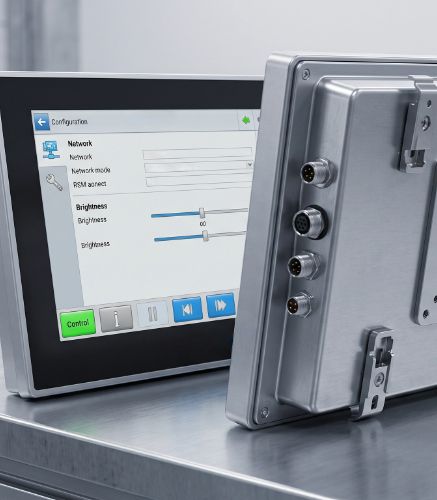
A conventional monitor displays an image. An industrial HMI screen must do that and, in addition, withstand continuous use, vibrations, temperature changes, dust, humidity, frequent cleaning, gloves, reflections, and mechanical integration requirements. The difference is not just in the panel, but in the entire assembly: electronics, enclosure, touch interface, power supply, connectors, and control software.
What an industrial HMI screen is used for in a machine or line
The primary purpose of an HMI is to make a machine operable and understandable. On a production line, for example, it can display speed, temperature, sensor status, completed cycles, active alarms, and maintenance messages. In transportation, it can present route information, diagnostics, or driver assistance. In defense or naval environments, it can act as a robust supervision interface.
An industrial touchscreen also reduces reliance on physical buttons when the design permits. This makes it easier to create more flexible interfaces, update menus, add languages, modify operating flows, and adapt the final product to different customers or machine versions.
HMI screen, PLC, and SCADA: How they work together
The HMI does not replace the PLC or the SCADA system. Each element performs a different function within the automation architecture.
The PLC executes the control logic: inputs, outputs, sequences, safety, and automatisms.
The HMI screen allows the user to view statuses, enter commands, and operate the system visually.
SCADA supervises broader processes, typically with data history, centralized control, and oversight of multiple machines or facilities.
In compact projects, an HMI with an integrated CPU can cover many local visualization and control needs. In more complex systems, it integrates with PLCs, servers, industrial networks, or higher-level applications. The key is to define from the start what level of autonomy, connectivity, and processing the interface requires.
How to choose an HMI screen for industrial environments
Choosing an HMI should not start with screen size, but with the operating environment. An interface installed in an indoor machine does not have the same requirements as a screen exposed to sunlight, vibrations, metallic dust, or splashes. Nor is an HMI used with gloves the same as an interface intended for precise interaction with multiple touchpoints.
HMI screen with capacitive or resistive touch
Touch technology conditions the user experience. Projected capacitive touch usually offers better sensitivity, multi-touch, and a feel closer to modern devices. Resistive touch can be useful when priority is given to use with gloves, styluses, or conditions where physical pressure is more reliable.
The choice depends on the environment, the type of user, and the criticality of the operation. In some projects, the best solution is not choosing a catalog technology, but adjusting the front glass, optical treatment, and touch interface to the actual use case.
Industrial monitor with suitable brightness, protection, and mounting
Brightness, IP protection rating, anti-glare treatment, thermal range, and mounting type are decisive criteria. An industrial monitor may require panel mounting, VESA, open frame, or complete integration into a custom housing. It may also require specific connectors, protected power supplies, or integrated Intel and ARM CPUs.
That is why it makes sense to evaluate solutions like an HMI with an integrated Panel PC, especially when the project needs a screen that processes data, executes a local application, or simplifies the final equipment installation.
Advantages of a custom HMI screen versus a standard solution
A standard HMI may be sufficient in simple projects, but many machinery manufacturers, integrators, and OEMs need more control. Customization allows adapting the product to space constraints, industrial aesthetics, connectivity, regulations, component lifespan, and environmental conditions.
The most important advantage is consistency between mechanical design, electronics, and operating experience. When the HMI is designed for the specific application, adapters, intermediate parts, incompatibilities, and maintenance issues are reduced. In demanding sectors, this difference translates into fewer incidents and cleaner integration.
Furthermore, working with a manufacturer like Inelmatic helps maintain design control from Valladolid, with the capacity to adjust metal structures, optics, CPUs, connectors, and mounting according to the project.
Conclusion on industrial HMI screens
An HMI screen is not simply a touchscreen placed on a machine. It is the interface that allows operating, supervising, and understanding a technical system under real working conditions. Choosing it properly involves evaluating the environment, user, connectivity, touch technology, mechanical integration, and customization capability.
When a project demands robustness, operational continuity, and adaptation to the final hardware, a custom industrial HMI can make the difference between an interface that merely displays information and a solution that truly improves operations.
Frequently Asked Questions about HMI screens
What is an HMI screen?
An HMI screen is a human-machine interface that allows visualizing data, controlling functions, and operating a machine or industrial system through a screen, usually a touchscreen.
What is an industrial HMI screen used for?
It is used to display statuses, alarms, parameters, commands, and operating messages in machinery, transportation, defense, healthcare, or any environment where a person needs to interact with technical equipment.
What is the difference between HMI and SCADA?
The HMI usually focuses on local operation of a machine or equipment, while SCADA supervises broader processes, with data logging, centralized control, and oversight of multiple facilities or lines.
What is the difference between an HMI screen and a Panel PC?
An HMI can be just a visualization and control interface, whereas a Panel PC integrates a screen and a computer into the same unit. In many industrial projects, both functions can be combined.
What type of touch technology is recommended for an HMI screen?
It depends on the application. Projected capacitive is comfortable, precise, and multi-touch; resistive can be advantageous in environments involving gloves, styluses, or conditions where physical pressure provides reliability.
When is a custom HMI screen recommended?
It is recommended when the project requires specific mounting, environmental protection, specific connectivity, an integrated CPU, special brightness, sector regulations, or a mechanical integration that a standard solution does not solve well.