An open frame monitor is a display designed to be integrated into another structure.
The key to an open frame monitor lies in its ease of integration.
At Inelmatic, open frame integrable monitors and displays are oriented toward industrial projects, transportation, information points, POS, vending machines, self-service terminals, and equipment where the screen must fit inside a larger design.
What open frame monitor means
Open frame means open chassis.
An open frame monitor can include a front glass, resistive or capacitive touch panel, metallic chassis, video input, additional connectivity, specific protection, and mounting options.
When to use an open frame monitor instead of a closed monitor
It is advisable to use an open frame monitor when the display will not be a standalone element, but an integrated part of the final equipment. This occurs in industrial machines, control panels, interactive kiosks, sales terminals, medical devices, transportation systems, or signage solutions.
A closed monitor may be simpler for an office, but it often causes issues when clean integration is needed: redundant housings, inadequate mounts, poorly resolved ventilation, inaccessible buttons, or an aesthetic inconsistent with the final product.
Open frame allows for designing around the screen. This provides better control over the front panel, ergonomics, protection, maintenance access, and user experience.
Common applications of industrial open frame monitors
Open frame monitors appear in many products where the end user does not perceive the screen as an independent monitor, but as a natural part of the equipment.
Self-service kiosks and information points with touch interaction.
Vending machines, ticketing, access control, and payment terminals.
Control panels in industrial machinery or technical cabinets.
Displays integrated into transportation, trains, buses, or special vehicles.
Medical, healthcare, or laboratory equipment with custom designs.
Digital signage systems where the screen is integrated into a cabinet or enclosure.

In all these cases, the value lies not only in showing an image, but in integrating without friction into the product. That is why mounting, brightness, touch technology, resistance, and component availability weigh as heavily as screen size.
Touch open frame monitor: capacitive, resistive, and front glass
Many projects require the open frame monitor to be a touchscreen.
The front glass is also important.
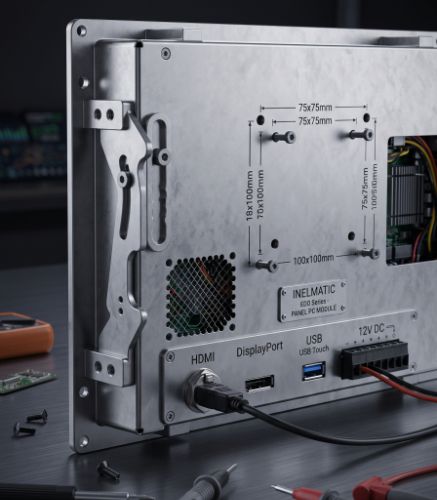
VESA mount, panel mounting, and other forms of integration
Mounting defines whether the screen will be easy to install and maintain. Some applications require a VESA mount, others panel mounting, rack mounting, front embedding, or custom bracketry.
Therefore, it is advisable to review available space, access direction, ventilation, front panel thickness, connector position, and how the screen will be replaced if maintenance is needed. In industrial projects, a screen that is hard to remove can multiply downtime.
LCD monitor ranges categorized by installation type help organize these decisions: open frame, rack, wall mount, panel mount, VESA, or special integration according to the final equipment.
Open frame monitor with integrated CPU: when it makes sense
In some projects, a screen alone is not enough.
This option reduces separate components and simplifies wiring, but should be evaluated carefully. Integrating a CPU into the screen can be excellent for a kiosk, terminal, or compact machine; separating CPU and display may be better when multiple screens, higher processing power, or independent maintenance are needed.
How to choose an open frame monitor for an OEM project
Selection should start with the final product. An OEM needs to know whether the screen will be indoors or outdoors, whether it will sustain impacts, if it will be cleaned frequently, whether the user will wear gloves, if ambient brightness will be high, and whether the equipment will be manufactured over several years.
It is also worth reviewing component availability, certifications, panel lifespan, electrical compatibility, connectors, power consumption, and customization options.
Working with Inelmatic allows addressing the monitor as an integrated part of the product, not as an isolated component. That approach is especially useful when the final design demands a metallic chassis, specific touch technology, custom connectors, or adaptation to a demanding environment.
Conclusion on open frame monitors
An open frame monitor is the right option when the screen needs to be part of a machine, kiosk, panel, or industrial product. Its main advantage is that it allows integrating the display, touch panel, mounting, and electronics into the customer's design.
Choosing well implies looking beyond inches and resolution. Mounting, touch technology, protection, brightness, connectors, maintenance, and lifespan must be evaluated.
Frequently Asked Questions about open frame monitors
What is an open frame monitor?
It is an open-chassis screen designed to be integrated into another structure, such as a machine, kiosk, terminal, industrial panel, or custom enclosure.
What is the difference between an open frame monitor and a closed monitor?
A closed monitor is used as a standalone device. An open frame monitor is prepared to be embedded or fixed inside a larger product, offering greater integration flexibility.
Can an open frame monitor be a touchscreen?
Yes.
What is a VESA mount on a monitor?
VESA is a mounting standard that defines distances between fixing holes, such as 75x75 or 100x100 mm.
Where is an open frame monitor used?
It is used in interactive kiosks, self-service terminals, vending machines, industrial panels, transportation, healthcare, digital signage, and OEM equipment with custom designs.
When is it advisable to customize an open frame screen?
It is advisable when a project requires dimensions, mounting, touch technology, connectors, protection, brightness, or mechanical structures that a standard screen cannot properly fulfill.