In industrial automation, it is common to encounter three concepts grouped together: HMI, SCADA, and PLC. Although they are related, they do not mean the same thing nor do they fulfill the same function. Confusing them can lead to selecting the wrong display, over-dimensioning a supervision system, or assigning tasks to a controller that do not belong to it.
The simplest way to understand them is to think of a control chain. The PLC executes the machine's logic, the HMI allows a person to interact with that machine, and the SCADA supervises complete processes, typically with a broader view, historical logging, and centralized management.
What is a PLC in the Context of HMI, SCADA, and PLC?
A PLC, or Programmable Logic Controller, is the device that governs the logic of a process or machine. It reads signals from sensors, executes programmed instructions, and activates outputs to motors, valves, relays, actuators, or other field devices.
Its primary job is not to display polished graphics or generate advanced reports. Its priority is reliable control. For this reason, it is designed to operate in industrial environments with predictable execution cycles and resistance to conditions that a conventional computer could not withstand.
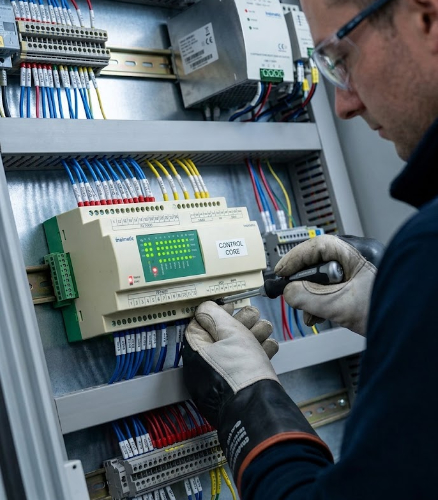
On a production line, the PLC can decide when a conveyor belt starts, when a machine stops, when an alarm triggers, or when an operation must be locked out for safety. Without a PLC, automation loses its control core.
What is an HMI Screen and What Does It Bring to Industrial Automation?
An HMI screen is the interface between the human and the machine. HMI stands for Human-Machine Interface. Its function is to allow operators, technicians, or plant managers to visualize statuses, modify parameters, acknowledge alarms, and execute authorized actions.
The HMI screen does not replace the PLC; it complements it. The PLC continues to run the control logic, while the HMI translates that logic into a manageable visual experience. A good interface prevents errors, speeds up diagnostics, and allows clear operation even during long shifts or under demanding conditions.
When the environment requires mechanical resistance, brightness, industrial touch capabilities, cabinet integration, or communication with specific equipment, it is best to work with industrial HMI screens designed for that context rather than generic monitors adapted after the fact.
Industrial HMI: More Than a Touchscreen
An industrial HMI is not just a touchscreen. It can include an integrated computer, communication ports, a metal enclosure, protective glass, capacitive or resistive touch, high brightness, panel mounting, specific connectors, and software tailored to the project.
Therefore, in projects with requirements for long lifecycles, vibration resistance, dust, humidity, thermal ranges, or mechanical integration, selecting the HMI must be part of the overall machine design. The display is the visible point, but behind it are choices regarding electronics, optics, firmware, mounting, and maintenance.
What is SCADA and When Does It Come Into Play?
SCADA stands for Supervisory Control and Data Acquisition. It is a supervision and data collection system that allows complete processes to be controlled and monitored from a higher layer. It typically gathers information from multiple PLCs, HMIs, sensors, remote stations, or distributed devices.
Unlike an HMI, which is usually positioned near a specific machine or cell, SCADA provides a broader overview: an entire plant, a network of facilities, a control station, historical variable logs, trends, alarms, reports, and user permissions.
In a factory, SCADA can display the status of several lines simultaneously. In transportation or energy, it can monitor distributed assets. In any case, its value lies in converting operational data into supervisable, traceable, and actionable insights for decision-making.
How HMI, SCADA, and PLC Work Together in an Installation
The relationship among HMI, SCADA, and PLC typically follows a functional logic: the PLC controls, the HMI operates, and the SCADA supervises. Each layer must communicate with the others using appropriate protocols and a clear architecture.
A simple example is a machine equipped with temperature sensors, motors, and valves. The PLC reads the sensors and controls the actuators. The HMI enables the operator to view temperature readings, alter a setpoint, or acknowledge an alarm. The SCADA logs data over time, compares metrics across shifts, and generates alerts for maintenance or production teams.
When the HMI incorporates computing power as seen in certain Panel PCs featuring ARM or Intel CPUs it can handle more advanced visualization, communication, and local processing tasks, provided the system architecture accounts for it from the start.
Practical Differences Between HMI, SCADA, and PLC
The following comparison summarizes the role of each element without establishing a rigid boundary. While overlaps may exist in real-world projects, this overview helps define responsibilities:
This separation is useful during the design phase because it prevents demanding incompatible functions from a single device. It also helps clarify whether a project requires a basic screen, an advanced HMI, a Panel PC, or a complete SCADA architecture.
How to Choose an HMI Screen to Work with PLCs and SCADA
Selecting an HMI screen shouldn't start with size alone. First, define which protocols it must support, where it will be installed, what data it will display, the required brightness level, which touch technology works best, and the expected system lifespan.
Physical integration is equally critical. An HMI for an industrial cabinet, a screen for a vehicle cab, an outdoor panel, and a machine-embedded monitor each have distinct mounting, ingress protection, power supply, and ruggedness requirements.
Inelmatic designs and manufactures industrial monitors, HMI screens, and Panel PCs with custom options for electronics, mechanics, optics, and connectivity. This capability is especially valuable when off-the-shelf products don't fit project specifications.
Furthermore, if your project requires a screen with an integrated computer, an all-in-one Panel PC solution should be evaluated—especially when visualization, local processing, and ruggedness must coexist in a single unit.
Frequently Asked Questions About HMI, SCADA, and PLC
What is the difference between HMI and PLC?
The PLC controls machine logic, while the HMI allows a person to view data, adjust parameters, and manage alarms locally.
What is the difference between HMI and SCADA?
An HMI typically operates a specific machine or area, whereas SCADA supervises entire processes, logs historical data, and provides a centralized view.
Can an HMI screen operate without a PLC?
It depends on the application. Some screens can display data from other equipment or run standalone software, but in industrial automation, they usually operate connected to a PLC or another controller.
When should a Panel PC be used as an industrial HMI?
A Panel PC is ideal when higher processing power, custom software, multiple communication channels, advanced visualization, or integration into a complex architecture is required.
What features should an industrial HMI screen have?
It should feature the appropriate screen size, brightness, touch technology, mounting option, connectivity, durability, and lifespan tailored to its real-world operating environment.
Does Inelmatic manufacture custom HMIs for automation?
Yes. Inelmatic develops displays, Panel PCs, and electronic solutions tailored to the demanding requirements of industrial, transportation, defense, medical, and other specialized sectors.