Choosing between a Panel PC, an HMI, and a Box PC may seem like a minor technical decision, but it shapes the entire architecture of an industrial project. It affects available space, maintenance, user interface, computing power, connectivity, and the lifespan of the equipment.
The right choice does not depend solely on whether the system needs a screen. It depends on where it will be installed, who will use it, what data it must process, what environment it must withstand, and how much control the manufacturer needs over the final design.
In OEM projects, transportation, defense, industrial machinery, or onboard signage, working with solutions like a Panel PC and an all-in-one display with an integrated CPU allows combining visualization and computing into a single robust unit, with less cabling and a cleaner installation.
What is an industrial Panel PC and when does it make sense to choose it?
A Panel PC is a computer integrated into a screen. It combines a display, CPU, memory, storage, connectivity, and, in many cases, a touch panel into a single unit. Its main advantage is that it simplifies integration when the user needs to interact directly with a local application.
It makes sense to choose an industrial panel pc when the equipment must be installed in a machine, cabinet, vehicle, control station, or terminal where the screen and computer form part of the same operating point. It is also a solid option when looking to reduce overall volume, external connectors, and dependencies between multiple devices.
What is an HMI and when is an operating interface enough?
An HMI is a Human-Machine Interface. It can have its own processing capacity, but its primary role is to allow the user to view statuses and act on a machine or process. In many projects, the HMI communicates with PLCs, controllers, sensors, or higher-level systems.
Opting for an HMI is advisable when operational interaction is the top priority: menus, alarms, parameters, start/stop functions, diagnostics, or local supervision. If the application does not require a powerful CPU or running complex software directly on the screen, an HMI can be more straightforward and efficient.
On the other hand, if you need to run applications, process data, or integrate advanced features in addition to the interface, an HMI solution with an integrated Panel PC may make more sense.
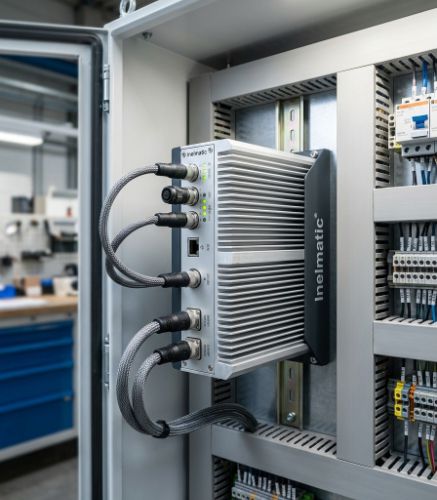
What is an industrial Box PC and when to separate it from the screen
An industrial Box PC is a computer without an integrated display. It is installed separately from the monitor and is typically used when computing power must be located in a protected area, when multiple screens are required, or when access to hardware must be independent of the visual interface.
This architecture is useful in vehicles, technical cabinets, embedded systems, media players, industrial control, or applications where the screen is exposed, but keeping the computer in a more protected zone is preferred. It also simplifies replacing the screen and CPU independently if their lifecycles do not coincide.
For these types of projects, rugged computers with ARM or Intel CPUs allow working with industrial hardware adapted to specific vibration, power supply, temperature, and connectivity requirements.
Panel PC, HMI, or Box PC: Practical decision criteria
The decision should start with the functional design of the system. Before choosing a product, it is helpful to answer five questions: where will it be installed, who will use it, what software will it run, what environmental conditions must it withstand, and how will it be maintained over the years?
Choose a Panel PC if you need a screen and computer in a single unit, with compact installation and direct operation.
Choose an HMI if the priority is a clear control interface connected to PLCs or automation systems.
Choose a Box PC if you want to separate computing from visualization, protect the CPU, or connect multiple displays.
Choose a custom solution if there are mechanical constraints, special connectors, specific brightness requirements, sector regulations, or demanding lifecycles.
A common mistake is deciding based solely on initial cost. In industrial environments, the real cost appears in integration, downtime, spare parts, incompatibilities, and maintenance. An apparently cheaper piece of equipment can end up being expensive if it forces you to add external adapters, fans, mounts, or protective enclosures.
Industrial Panel PC: Technical factors you shouldn't overlook
CPU, operating system, and performance in a Panel PC
The CPU should be chosen based on the application. An ARM processor may be sufficient for lightweight interfaces, digital signage, or low-power embedded tasks. An Intel or x86 architecture may be preferable when running heavier industrial software, Windows applications, local databases, or more demanding processing.
The operating system also matters. Windows IoT, embedded Linux, or other industrial variants can dictate drivers, maintenance, updates, and compatibility with the client's software.
Mounting, protection, and cooling in an industrial panel pc
The physical format is just as important as the electronics. A Panel PC can be mounted on a panel, wall, VESA mount, rack, or integrated into a custom structure. Front protection, glass type, sealing, thermal range, and fanless design directly impact reliability.
In environments with dust, vibration, or continuous operation, reducing moving parts and tuning the thermal design helps prevent failures. That is why many industrial projects prioritize fanless equipment, metal enclosures, and long-availability components.
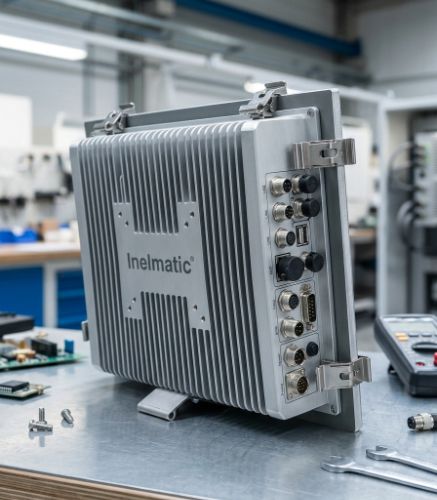
Why customization changes the choice between HMI, Panel PC, and Box PC
The boundary between an HMI, Panel PC, and Box PC is not always rigid. One project may require a screen with an integrated CPU, another a rugged display connected to a separate computer, and another a highly specific touchscreen interface for a particular machine.
Customization allows resolving this line more intelligently. Instead of fitting the project into a rigid catalog, parameters like size, CPU, touch technology, enclosure, connectors, power supply, OS, mounting, and finishes are tailored to the final equipment.
This capability is especially valuable for OEMs and integrators manufacturing series, as making a well-informed decision at the start reduces installation, support, and product evolution issues later on.
Conclusion on Panel PC, HMI, and Box PC
A Panel PC is the best option when the screen and computer must operate as a compact unit. An HMI fits when machine operation is the main priority. A Box PC is preferred when it makes sense to separate computing from visualization.
The most solid decision combines architecture, environment, software, mounting, and maintenance. When these factors are analyzed from the beginning, the hardware ceases to be an isolated component and becomes a coherent part of the industrial product.
Frequently Asked Questions about Panel PC, HMI, and Box PC
What is a Panel PC?
A Panel PC is an integrated computer within a display. It includes a CPU, memory, connectivity, and screen in a single unit, typically with touchscreen options for industrial use.
What is the difference between a Panel PC and an HMI?
An HMI focuses on the operating and visualization interface. A Panel PC also incorporates full computing capability, enabling it to run industrial applications or more advanced local software.
When is it advisable to use an industrial Box PC?
It is recommended when the CPU needs to be separated from the display, protected inside a technical cabinet, connected to multiple screens, or maintained independently from the display unit.
Can an industrial Panel PC run without a fan?
Yes. Many industrial Panel PCs are engineered as fanless systems to reduce maintenance, prevent dust entry, and improve reliability in demanding environments.
Which CPU should I choose for an industrial Panel PC?
It depends on the software, power consumption, temperature limits, connectivity, and performance required. ARM can suit lightweight applications, while Intel or x86 is usually preferred for more demanding industrial software.
When is it worth customizing a Panel PC?
It is worth it when the project demands special mounting, custom connectors, environmental protection, specific brightness, a particular CPU, industry regulations, or seamless mechanical integration into an OEM product.